Capture the copy.
Supported text and links enter a capture pipeline with privacy checks before clipboard content is read.
The copy is only half the story.
A Windows clipboard-history project built to retain copied information together with the source context available at the time.
Explore RETRACE ↓IN DEVELOPMENT · NO PUBLIC DOWNLOAD
This supplied concept shows the intended experience. Image/file capture, advanced search and the pictured quick actions are not yet verified in the current implementation.
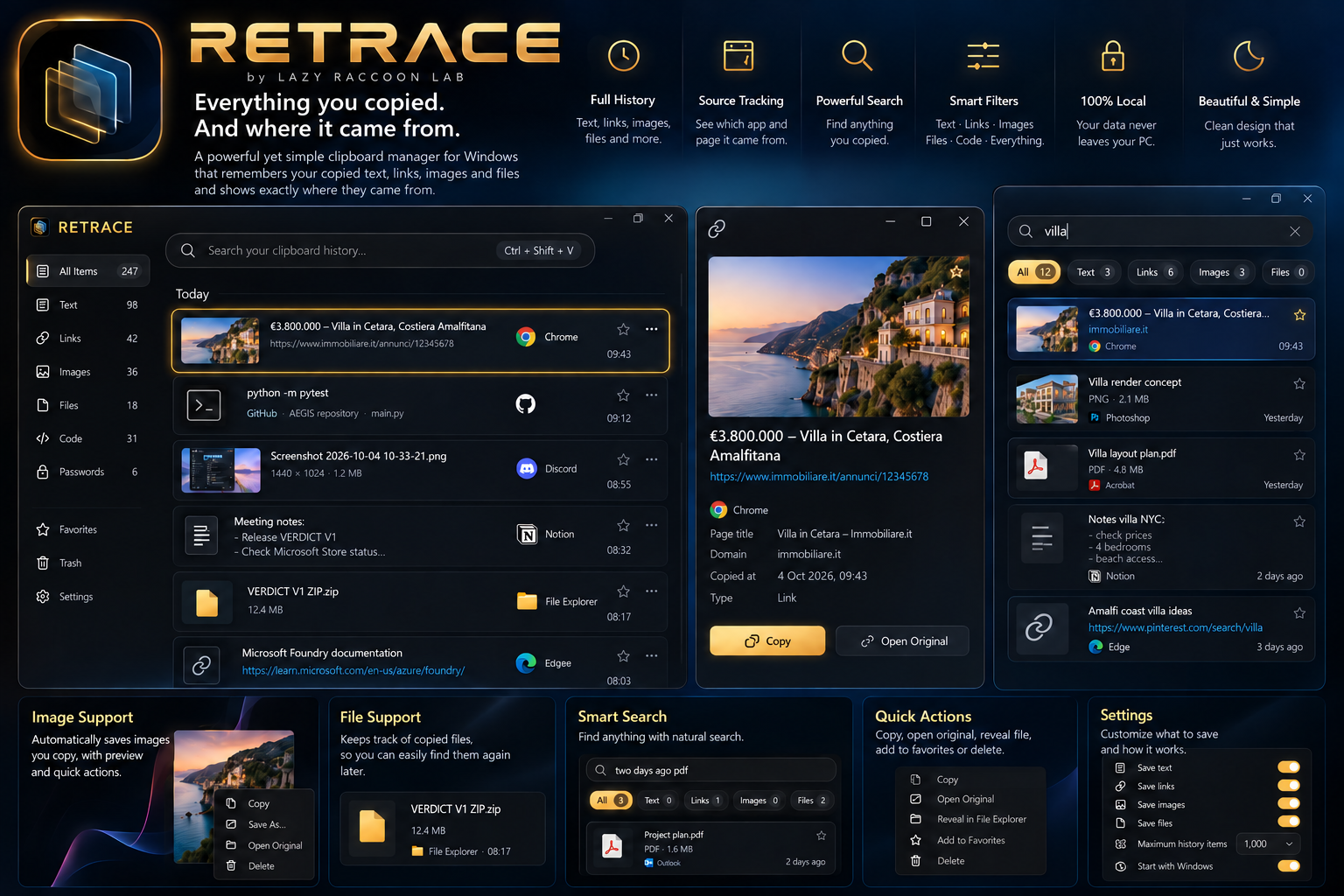
The current code implements text/link capture and source provenance. The complete history interface is still being built.
Supported text and links enter a capture pipeline with privacy checks before clipboard content is read.
Record available application and window information. A source URL is kept when supplied by valid clipboard metadata; it is not guessed.
The current storage layer saves content and copy events in a local SQLite database, with duplicate handling.
The tagline describes the product direction, not a guarantee that every clipboard format or source can be captured. Current capture supports text and links. Missing source information stays missing.
Local persistence and pre-read privacy checks are implemented. We do not claim complete application privacy guarantees or the full concept feature set as finished.
Ask about RETRACE ↗